Why Linux Skills Are Important for Cyber Security Professionals
Learn why Linux skills are essential for cyber security professionals, from ethical hacking and network security to threat detection, system administration, and incident response.
 Nashid Hussain CN
Cyber security professionals need practical technical skills to identify threats, protect systems, investigate suspicious activities, and respond to security incidents. Understanding operating systems is an important part of this work, as many security tasks involve monitoring networks, checking system activity, managing files, and identifying unusual behaviour. Linux is widely used in technical environments and helps professionals develop these essential skills.
Learning Linux for cyber security helps students, freshers, IT professionals, and aspiring ethical hackers understand how computer systems work behind the scenes. Linux offers useful command-line tools, access controls, networking utilities, and security-focused distributions that support various cyber security tasks. Developing Linux skills for cyber security can help learners build a strong technical foundation and prepare for more advanced security concepts.
Another advantage of learning Linux is that it provides hands-on experience with system administration, troubleshooting, and security analysis. Whether someone wants to explore ethical hacking, work as a SOC analyst, or learn digital forensics, knowledge of Linux can be useful across various cyber security roles.
Here, we will discuss why Linux skills are important for cybersecurity professionals, the essential commands and concepts to learn, popular Linux distributions, and practical ways beginners can develop these skills for a cyber security career.
Why Linux Skills Are Essential for Cyber Security Professionals
Linux knowledge is useful because cyber security work involves understanding the systems that attackers may target. Professionals need to know how applications run, where logs are stored, how services communicate, and how access permissions affect system security.
The importance of continuous technical learning is also reflected in industry research. According to the ISC2 India Cybersecurity Workforce Study, published in September 2026, based on responses from 524 cyber security professionals in India, 97% of respondents reported at least one cyber security skills need in their organization, while 74% described those needs as critical or significant. The research highlights the importance of developing relevant technical capabilities as security requirements continue to change.
Although this report does not specifically measure demand for Linux skills, it supports the value of continuous learning and practical training.
Here are some reasons Linux knowledge matters in cybersecurity:
- System monitoring: Linux commands help professionals inspect processes, services, resource usage, and system logs.
- Access control: Understanding users, groups, and file permissions helps prevent unauthorized access.
- Network troubleshooting: Built-in utilities help investigate connectivity, listening ports, and network activity.
- Security testing: Linux distributions provide tools for authorized penetration testing and vulnerability assessment.
- Automation: Shell scripts can automate repetitive administrative and security tasks.
These capabilities make Linux skills for cyber security useful across different technical roles. They also help beginners understand security concepts through practical exercises rather than theory alone.
Explore these articles:
- Cyber Security Risks in 5G-Connected Enterprise Networks
- How Organizations Can Implement Security Controls for Generative AI Systems
- What Is OWASP Top 10 in Cyber Security and How Does It Work
Essential Linux Skills Every Cyber Security Professional Should Know
Building Linux knowledge starts with basic system administration and gradually progresses to networking, access control, scripting, and security analysis. Beginners do not need to master every advanced feature immediately. They should first understand the commands and concepts used in everyday technical work.
Essential Linux Commands for Cyber Security
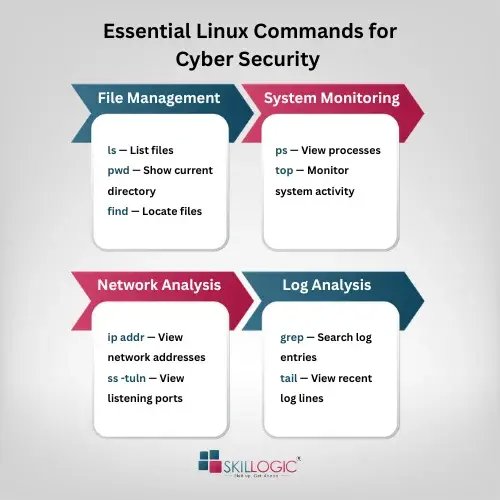
Basic Linux Commands and File Management
Linux commands allow users to navigate directories, manage files, inspect system information, and perform administrative tasks. Learning these commands helps cyber security learners become comfortable working in a terminal.
Some important commands include:
- pwd displays the current working directory.
- ls lists files and directories.
- cd changes the current directory.
- cat displays file contents.
- grep searches for matching text in files.
- find locates files and directories.
- ps displays information about running processes.
- df -h shows disk space usage in a readable format.
For example, security professionals can use grep to search a log file for failed login messages. They can use ps to review running processes when investigating unusual system activity.
These basic Linux commands for cyber security provide a foundation for more advanced tasks, including log analysis, incident investigation, and system troubleshooting.
User Permissions and Access Control
Linux supports a permission system that controls who can read, modify, or execute files. Users and groups help administrators manage access to system resources.
Commands such as whoami, id, chmod, and chown help users understand account details and manage permissions when authorized.
For example, a file containing sensitive configuration information should not be accessible to every user. Appropriate permissions reduce the risk of accidental disclosure or unauthorized modification.
Cyber security professionals should also understand the risks associated with excessive administrative privileges. The sudo command allows permitted users to execute specific commands with elevated privileges, so it should be used carefully.
Learning permissions is an important part of linux skills for cyber security because weak access controls can expose systems to unnecessary risks.
Networking Commands and Troubleshooting
Network knowledge is essential for understanding how devices communicate and how attackers may exploit network weaknesses. Linux provides several commands for examining connections and diagnosing network problems.
Useful commands include:
- ip addr displays network interface addresses.
- ping tests basic network reachability.
- ss -tuln displays listening TCP and UDP sockets.
- ip route displays routing information.
- dig helps investigate DNS records.
- traceroute helps examine the path taken by network traffic.
For example, a security analyst may use ss -tuln to identify services listening for connections on a Linux server. The analyst can then determine whether those services are expected and appropriately protected.
These commands are useful for troubleshooting and security monitoring. However, identifying an open port does not automatically mean a system is vulnerable. Professionals must evaluate the service, configuration, exposure, and surrounding security controls.
Shell Scripting and Automation
Shell scripting allows users to combine commands into scripts that perform repetitive tasks automatically. This can save time and reduce manual effort when working with large amounts of system information.
A simple shell script can check whether a particular service is running, search logs for specific messages, or organize information collected during an authorized investigation.
For example, a script could search a system log for repeated failed authentication attempts and save matching entries for further review. A security analyst could then investigate the source, timing, and context of those events.
Automation is particularly helpful when managing multiple systems or performing routine checks. However, scripts should be tested carefully, use appropriate permissions, and avoid exposing sensitive information.
Read these articles:
- How to Become a Cyber Security Expert in India
- Cyber Security Scope in India
- Cyber Security in India: What You Need to Know
How Linux Is Used in Different Cyber Security Roles
Linux plays an important role in several cyber security job roles, including ethical hackers, penetration testers, SOC analysts, and digital forensics and incident response professionals. Each role uses Linux tools and commands for specific tasks, such as identifying vulnerabilities, monitoring suspicious activities, analyzing system logs, and investigating security incidents.
Ethical Hacking and Penetration Testing
Ethical hackers test systems with permission to identify weaknesses before malicious attackers can exploit them. Linux-based environments provide tools for network discovery, vulnerability assessment, traffic analysis, and security testing.
For example, Nmap can help identify hosts and services within an authorized testing scope. Wireshark can help examine network traffic, while other tools support web application testing and vulnerability analysis.
Understanding linux for ethical hacking helps learners operate these tools, interpret their output, and troubleshoot technical problems. However, knowing how to launch a tool is not enough. Ethical hackers must also understand networking, operating systems, common vulnerabilities, and responsible testing practices.
Security Operations and Threat Detection
Security operations centre (SOC) analysts monitor systems and investigate suspicious activities. Their responsibilities may include reviewing alerts, examining logs, identifying unusual behaviour, and supporting incident response.
Linux knowledge helps analysts inspect authentication records, investigate processes, check service activity, and understand events reported by security monitoring tools.
For example, repeated failed login attempts followed by an unusual successful login may require investigation. An analyst can review the relevant logs, verify the account activity, and determine whether the event is suspicious.
Linux is not the only platform used in security operations, but its command-line capabilities are valuable when investigating Linux servers, cloud workloads, and other supported environments.
Digital Forensics and Incident Response
Digital forensics involves collecting and examining digital evidence, while incident response focuses on detecting, containing, and recovering from security incidents.
Linux tools can help professionals examine files, calculate file hashes, review logs, and inspect system activity. Forensic investigations require careful evidence handling to preserve integrity and maintain a reliable record of actions.
For example, investigators may calculate a SHA-256 hash to help verify whether a file has changed during analysis. They may also inspect timestamps and relevant logs to reconstruct a sequence of events.
Professionals must follow approved forensic procedures and avoid modifying original evidence unnecessarily. Linux knowledge helps them perform these tasks more confidently and systematically.
Popular Linux Distributions Used in Cyber Security
Linux comes in different distributions, each designed for particular needs. Some focus on general computing, while others include tools for security testing and digital investigations.
Top Linux Distributions for Cyber Security
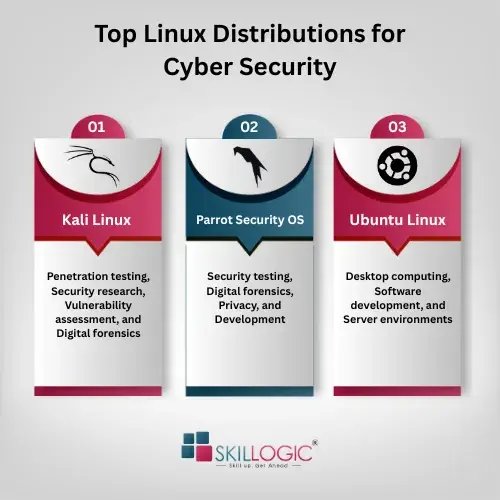
Kali Linux
Kali Linux is a security-focused distribution maintained by Offensive Security. It includes a wide range of tools for penetration testing, security research, vulnerability assessment, and digital forensics.
kali linux for cyber security is a common learning choice for people who want to practise ethical hacking in a controlled lab. Learners can explore networking tools, examine test environments, and understand how security assessments are performed.
However, beginners should first develop basic Linux and networking knowledge. They should use Kali tools only on systems they own or have explicit permission to test.
Parrot Security OS
Parrot Security OS is another Linux distribution designed for security testing, digital forensics, privacy, and development. It provides a collection of security tools and a desktop environment suitable for different technical tasks.
Learners can use Parrot to practise command-line operations, explore security utilities, and build a controlled testing environment. Choosing between Parrot and Kali often depends on personal preference, learning requirements, and the tools needed for a particular task.
Ubuntu Linux
Ubuntu is a general-purpose Linux distribution widely used for desktop computing, software development, and server environments. It is a practical starting point for beginners who want to understand Linux administration before moving into specialized security tools.
Students can practise file management, user permissions, package installation, networking, and system updates in Ubuntu. These fundamentals transfer to many other Linux distributions.
How Linux Skills Help Beginners Start a Cyber Security Career
Beginners often assume that cyber security requires advanced programming or expertise in complex security tools from the beginning. In reality, learning fundamental technical concepts is a more practical starting point.
Linux can help learners understand how operating systems manage users, processes, files, services, and network connections. These concepts are relevant to roles such as junior security analyst, SOC analyst, IT support specialist, system administrator, and entry-level penetration tester.
The ISC2 research mentioned earlier also identifies cloud security and application security among the important skills needs reported by cyber security professionals in India. Linux fundamentals can support learning in these areas, particularly when working with Linux-based servers and cloud workloads.
However, Linux alone does not guarantee a cybersecurity job. Learners should also develop networking knowledge, security fundamentals, analytical thinking, and communication skills. Practical lab experience and relevant projects can help demonstrate their abilities to employers.
For beginners, the best approach is to learn Linux alongside networking, basic scripting, log analysis, and security monitoring.
Practical Ways to Improve Your Linux Skills for Cyber Security
Consistent practice is more effective than memorizing long lists of commands. Beginners can build their knowledge through small exercises and gradually progress to more complex security tasks.
Here are some practical ways to improve:
- Set up a Linux lab: Install Ubuntu in a virtual machine or use another suitable Linux environment. A virtual machine lets you practise without changing your main operating system.
- Practise commands daily: Learn file navigation, searching, permissions, process management, and system monitoring.
- Explore system logs: Review sample logs and practise identifying authentication failures, service errors, and unusual events.
- Learn networking basics: Understand IP addresses, ports, DNS, routing, and common network troubleshooting commands.
- Write simple shell scripts: Automate safe tasks such as checking disk usage, searching sample logs, or listing running processes.
- Use security-focused distributions: Explore Kali Linux or Parrot Security OS after learning the fundamentals. Practise only in authorized lab environments.
- Document your projects: Record the commands used, the problem investigated, the results, and the lessons learned.
Learners should also keep their systems updated and understand the risks associated with running commands from untrusted sources. Commands that modify files, change permissions, or execute with administrative privileges should be reviewed before use.
By following a structured learning plan, students can develop linux skills for cyber security through practical experience and build confidence in handling real-world technical tasks.
Refer to these related articles:
- The Future of Cyber Security in Mumbai: Trends and Opportunities
- Guide to Becoming a Cyber Security Engineer in Mumbai
- Why Cyber Security Career in Pune
- Cyber Security Course Fees in Pune
In short, Linux is an important skill for cybersecurity professionals because it supports system administration, network monitoring, security testing, and incident investigation. Learning Linux for cyber security helps beginners understand system operations, manage permissions, and use essential security tools.
Developing Linux skills for cyber security through regular practice, hands-on projects, and security fundamentals can help learners prepare for roles in ethical hacking, security operations, and digital forensics. With continuous learning, they can build a strong foundation for a cyber security career.
Building a successful cybersecurity career starts with developing the right technical skills and practical knowledge. Choosing a top institute for cyber security courses in Pune or other cities that offers hands-on lab training, real-time projects, industry-relevant skills, and career support can help learners build a strong foundation and prepare for cyber security job opportunities.
SKILLOGIC offers the AI-powered Cyber Security Professional Plus Course for students, freshers, and working professionals looking to build practical cyber security skills. The course covers ethical hacking, network security, security operations, vulnerability assessment, and other essential topics through hands-on labs and real-world projects.
Learners also receive internship opportunities, placement assistance, and certifications from NASSCOM FutureSkills, IIFIS, and the SKILLOGIC Course Completion Certificate. With flexible online and classroom learning options, SKILLOGIC offers AI-integrated cyber security classes in Mumbai and has 25+ centers across India, including Bangalore, Chennai, Hyderabad, Pune, Mumbai, Ahmedabad, Delhi, and Nagpur. SKILLOGIC helps learners develop the technical knowledge and practical skills needed to pursue cyber security career opportunities.