
How Organizations Can Implement Security Controls for Generative AI Systems
Learn how organizations can implement security controls for generative AI systems to protect sensitive data, reduce AI security risks, and strengthen cybersecurity.
 Nashid Hussain CN
Organizations can protect generative AI systems by setting clear access rules, securing sensitive data, and monitoring AI usage. These measures help prevent unauthorized access and reduce security risks. A strong security strategy also helps businesses use AI tools safely. This allows organizations to benefit from AI while protecting important information.
As more companies adopt AI, protecting confidential data becomes increasingly important. Weak security can expose business information and affect customer trust. Strong generative AI security helps organizations identify threats and manage risks effectively. With the right safeguards, businesses can use AI more responsibly.
Here, we will discuss the major security risks, essential security controls, and best practices for protecting generative AI systems.
Understanding the Major Security Risks of Generative AI Systems
Before choosing security measures, organizations need to understand what can go wrong. Some risks come from attackers, while others result from employee mistakes, poor configurations, or weaknesses in connected applications.
IBM's Cost of a Data Breach Report provides useful evidence of these concerns. Based on research involving 600 organizations globally, the report found that 13% of surveyed organizations experienced breaches involving AI models or applications. Among organizations that experienced AI-related security incidents, 97% reported lacking proper AI access controls. The report also found that 60% of these incidents resulted in compromised data, while 31% caused operational disruption.
These findings show why businesses should pay attention to the way AI applications access and handle information. The statistics cover AI models and applications broadly, rather than generative AI alone.
Source: IBM's 2025 Cost of a Data Breach Report.
Here are some important risks organizations should consider.
- Sensitive Data Exposure: Sharing confidential information with AI tools can lead to data leaks and privacy issues.
- Prompt Injection Attacks: Malicious instructions can manipulate AI systems into revealing information or performing unsafe actions.
- Unauthorized Access: Poor access controls may allow AI tools to expose company data to unauthorized users.
- Unsafe AI-Generated Code: AI-generated code may contain security flaws and should be reviewed and tested.
- Third-Party Security Problems: Vulnerabilities in external AI services, APIs, or plugins can create security risks.
- Excessive Permissions: Giving AI agents unnecessary access to files, emails, or databases increases potential damage.
Understanding these risks helps organizations identify security gaps and choose the right controls to protect their generative AI systems and sensitive business data.
Refer to these articles:
- Network Security Fundamentals: Beginner’s Guide
- Why is Cybersecurity Important
- What Is a Fraud Detection System? How It Protects Businesses
Essential AI Security Controls Every Organization Should Implement
Once an organization understands its risks, it can choose security measures that match its AI applications and business requirements. There is no single tool that can solve every problem, so several controls should work together.
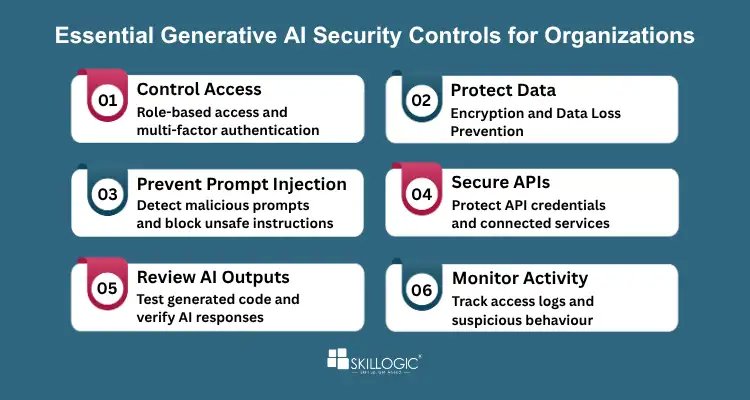
Essential Generative AI Security Controls for Organizations
Control access to AI applications
Not every employee needs access to every AI tool or company document. Organizations should use role-based access control and multi-factor authentication where appropriate. AI agents should also receive only the permissions required for their assigned tasks.
Protect business and customer data
Companies should decide which types of information can be used with approved AI services. Encryption, data masking, and data loss prevention tools can help protect sensitive information. Employees should also receive clear guidance on handling confidential files.
Check inputs and prevent prompt injection
AI systems should treat user prompts and retrieved documents as potentially untrusted. Organizations can test applications with malicious instructions, restrict access to sensitive functions, and separate trusted system instructions from external content. Input filtering can help, but it should not be the only line of defence.
Secure APIs and connected services
AI applications may connect to customer databases, cloud platforms, or internal business tools. Security teams should protect API credentials, review integrations, and limit the operations each connection can perform. Unused integrations should be removed.
Review AI-generated results
AI responses can be incorrect, misleading, or unsafe. Before using generated code, commands, or information in important business processes, employees should verify the output. Code scanning and application security testing are particularly important when AI-generated code will be deployed.
Monitor activity and investigate unusual behaviour
Organizations should keep appropriate records of AI usage, access attempts, and actions performed through connected services. Alerts can help security teams identify unusual activity, such as unexpected access to sensitive documents or suspicious API requests.
These generative AI security controls give organizations a practical starting point for protecting AI systems. The exact measures will depend on the sensitivity of the data, the capabilities of the application, and the potential impact of misuse.
AI Security Best Practices for Enterprise Environments
Organizations need more than cyber security tools to protect their AI applications. Employees should know how to use AI safely, and security teams should check new AI tools before allowing them to handle company information.
Set clear rules for AI use
Companies should create simple guidelines explaining which AI tools employees can use and what information they can share. Employees should also know whom to contact if they notice a security issue. Clear rules help prevent accidental data leaks and unsafe AI use.
Check AI tools before using them
Before adopting an AI service, organizations should understand how it stores, processes, and protects data. They should also review the permissions requested by plugins, APIs, and connected applications. This helps businesses avoid unnecessary cyber security risks.
Train employees to use AI safely
Employees may unknowingly share confidential documents or customer details with unapproved AI tools. Regular awareness sessions can help them recognize these risks and make safer decisions. Practical examples and simple instructions make security rules easier to follow.
Follow trusted security guidance
Organizations can refer to the National Institute of Standards and Technology (NIST) Generative AI Profile and the OWASP Top 10 for LLM Applications to understand common AI risks and ways to manage them.
Following these AI security best practices helps businesses create safer AI environments, protect sensitive information, and reduce the chances of security incidents.
Read More:
- How to Become a Cyber Security Expert in India
- Cyber Security Scope in India
- Why Cyber Security Course in India
How to Build a Generative AI Security Plan
Putting security measures into practice becomes easier when organizations follow a clear process. Instead of introducing every possible control at once, they can begin with their most important risks and improve protection step by step.
6 Steps to Build a Generative AI Security Plan
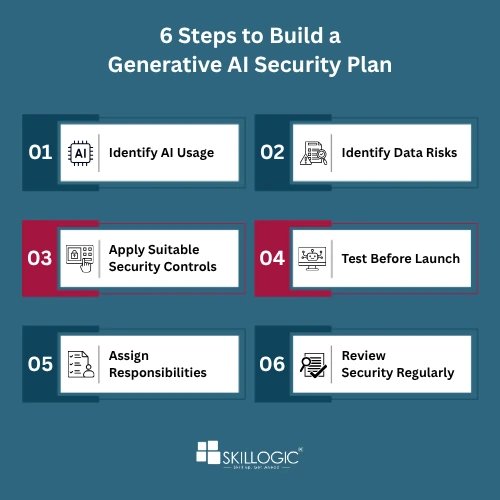
- Step 1: Identify AI Usage – List all AI tools, models, APIs, and connected applications used across the organization.
- Step 2: Identify Data Risks – Check what information each AI application handles and the impact of potential data exposure.
- Step 3: Apply Suitable Security Controls – Choose access restrictions, data protection measures, and approval processes based on risk.
- Step 4: Test Before Launch – Test for unauthorized access, malicious prompts, and actions beyond user permissions.
- Step 5: Assign Responsibilities – Define clear roles for IT teams, security professionals, developers, and business owners.
- Step 6: Review Security Regularly – Recheck permissions, monitor activity logs, and repeat security tests after major updates.
Consider a company that introduces an AI assistant to help employees find information in internal documents. The company can restrict the assistant's access according to employee roles, prevent it from retrieving unauthorized files, and require approval before it performs sensitive actions. Security teams can then test these restrictions and monitor activity after launch.
This approach helps businesses implement security controls according to real needs rather than relying on a generic checklist. It also makes security part of the AI deployment process from the beginning.
Common AI Security Mistakes Organizations Should Avoid
Some security problems arise because organizations focus on getting AI tools running quickly and leave protection measures for later. Avoiding a few common mistakes can make a significant difference.
- Using Unapproved AI Tools: Employees may expose company data by using unverified AI applications.
- Giving Too Much Access: AI tools should only access the files and systems they need.
- Relying Only on Filters: Prompt filters alone cannot prevent every AI security threat.
- Ignoring Third-Party Risks: Check the security of external AI services and plugins before using them.
- Skipping Security Testing: Test AI systems regularly to identify new weaknesses.
- Treating Security as a One-Time Task: Review and update security controls as AI tools and risks change.
Avoiding these mistakes requires cooperation between management, IT teams, security professionals, developers, and employees. Everyone who uses or manages AI has a role in protecting the organization.
Explore these articles:
- Cyber security in Hyderabad: Market Growth and Industry Insights
- Top Cyber Security Job Opportunities in Hyderabad
- Tips for Selecting the Top Cyber Security Institute in Chennai
- How Much is The Cyber Security Course Fee in Chennai
In short, Generative AI can improve business efficiency, but organizations must protect their systems from data leaks, unauthorized access, and other security threats. By applying the right security controls, testing AI applications, monitoring activity, and training employees, businesses can reduce risks and protect sensitive information. Making generative AI security an ongoing priority helps organizations use AI more safely and responsibly.
Learning cybersecurity skills can help professionals identify AI security risks, protect sensitive data, and implement security controls for generative AI systems. Choosing a top cyber security institute in Hyderabad or other cities that emphasizes practical training can help learners develop skills in access management, vulnerability assessment, threat detection, and security monitoring to address evolving AI security challenges.
SKILLOGIC offers an AI-integrated Cyber Security Professional Plus Course, a 4-month program with 200+ learning hours, practical projects, and internship opportunities. The course covers ethical hacking, vulnerability assessment, penetration testing, cloud security, and AI in cybersecurity, with accreditation from NASSCOM FutureSkills and IIFIS. With 22+ training centers across India, SKILLOGIC has a presence in Bangalore, Chennai, Hyderabad, Pune, Mumbai, Ahmedabad, Delhi, and Kolkata. Explore SKILLOGIC cyber security courses in Chennai to learn more about the available training options.