SQL for Business Analysts: How to Analyse Business Data
Learn how business analysts use SQL to retrieve, analyse, and interpret business data, identify trends, and support data-driven business decisions.
 Aiswarya N
Businesses collect data from sales transactions, customer interactions, marketing campaigns, and daily operations. However, collecting information is only the first step. Businesses also need to understand what the data means and how it can help them make better decisions.
SQL, which stands for Structured Query Language, helps business analysts retrieve and examine information stored in databases. It allows them to filter records, calculate results, compare performance, and identify patterns without manually checking every entry.
Learning SQL for business analysts can help beginners develop practical data analysis skills. Let’s understand how SQL works, which queries are useful, and how business analysts apply them to everyday business problems.
What is SQL for Business Analysts?
SQL is a language used to communicate with relational databases. These databases organise information into tables containing rows and columns. For example, a sales database might contain customer names, product details, order dates, quantities, and prices.
Business analysts use SQL to retrieve specific information from these tables and answer business questions. Instead of reviewing thousands of sales records individually, an analyst can write a query to find total sales for a particular month or identify the products generating the highest revenue.
SQL for business analysis is useful because it connects business questions with actual data. Analysts can use query results to prepare reports, investigate performance changes, and share findings with stakeholders.
Why is SQL Important for Business Analysts?
SQL helps business analysts work with data more efficiently and accurately. Its main benefits include:
- Direct database access: Retrieve the information needed for a particular analysis.
- Faster data analysis: Filter and summarise large datasets without manually reviewing every record.
- Performance tracking: Compare sales, customer activity, costs, and other business metrics.
- Data validation: Check whether figures in reports match the underlying database records.
- Better decisions: Provide evidence that helps managers understand problems and evaluate possible solutions.
For example, a manager may notice that monthly revenue has declined. An analyst can use SQL to compare sales across products, regions, and time periods to investigate the possible reasons.
This is one reason SQL for business analysts is a valuable skill for professionals who regularly work with reports and business data.
Read More:
- Cybersecurity Considerations for Business Analysts
- How Business Analysts Drive Digital Transformation
- Bridging the Gap Between IT & Business as a Business Analyst
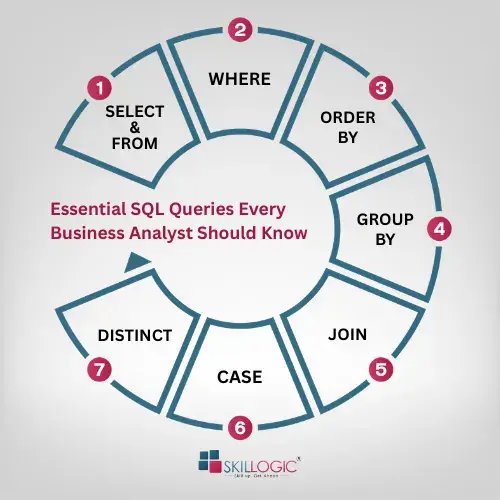
Essential SQL Queries Every Business Analyst Should Know
You do not need to learn every SQL command at the beginning. Start with the queries that help you retrieve, filter, organise, and summarise information.
The following are some of the most commonly used SQL commands that business analysts should understand when working with business data:
1. SELECT and FROM
The SELECT statement specifies which columns of data you want to retrieve, while the FROM clause identifies the database table from which the information is collected.
SQL Example:
SELECT product_name, price
FROM products;
This query displays the product names and their corresponding prices stored in the products table.
2. WHERE
The WHERE clause filters records based on a specific condition, helping analysts find relevant information.
SQL Example:
SELECT *
FROM sales
WHERE region = 'South';
This query retrieves only the sales records belonging to the South region.
3. ORDER BY
ORDER BY sorts query results in ascending or descending order, making it easier to compare values.
SQL Example:
SELECT product_name, price
FROM products
ORDER BY price DESC;
This query arranges products from the highest price to the lowest price.
4. GROUP BY and aggregate functions
GROUP BY organises records with matching values into groups, while aggregate functions such as COUNT(), SUM(), and AVG() calculate useful business metrics for each group
SQL Example:
SELECT region, SUM(sales_amount) AS total_sales
FROM sales
GROUP BY region;
This query calculates the total sales amount for each region, helping analysts compare regional sales performance.
5. JOIN
JOIN combines related information from multiple tables using a common column, allowing analysts to examine connected business records.
SQL Example:
SELECT customers.customer_name, orders.order_id
FROM customers
JOIN orders
ON customers.customer_id = orders.customer_id;
This query displays customer names alongside their order IDs by matching customer IDs in both tables.
6. CASE
The CASE expression assigns categories to records based on specific conditions, helping analysts classify business information.
SQL Example:
SELECT order_id, total_amount,
CASE
WHEN total_amount >= 10000 THEN 'High Value'
ELSE 'Low Value'
END AS order_category
FROM orders;
This query classifies orders as high-value or low-value based on their total amount.
7. DISTINCT
DISTINCT removes duplicate values from query results. Business analysts use it to identify unique regions, customer categories, or product types without counting repeated entries.
SQL Example:
SELECT DISTINCT region
FROM sales;
This query displays each sales region only once, helping analysts identify all the regions where sales activities take place.
These essential SQL queries help business analysts retrieve relevant information, identify patterns, compare results, and summarise business data. Understanding these commands provides a strong foundation for analysing datasets and supporting business decisions.
Read More:
- How to become a Business Analyst in India
- Business Analytics Scope in India
- How to Become a Business Analytics Expert in India
How Business Analysts Use SQL to Analyse Business Data
SQL becomes more useful when analysts apply it to specific business questions.
Here are some common examples:
Sales Analysis
Business analysts use SQL to examine revenue, compare product performance, and identify changes in sales over time. They can group transactions by month, region, or product category to understand which areas are performing well.
For example, a retail analyst might calculate monthly revenue for each branch. Comparing the results can help management identify underperforming locations and investigate whether pricing, demand, or stock availability could be contributing factors.
The Ken Research Global Business Intelligence Market report highlights the growing use of business intelligence platforms and governed analytical reporting. It reports that Microsoft Power BI had more than 30 million monthly active users across over 375,000 organisations in 2025. As businesses increasingly rely on shared reports and standardised metrics, analysts need to retrieve the correct data and apply consistent definitions. SQL can help them prepare and validate the information used in these reports.
Customer Analysis
Customer analysis helps businesses understand purchasing behaviour and customer retention. Analysts can use SQL to identify repeat purchases, compare customer spending, and find customers who have not placed an order recently.
For example, an e-commerce company might want to know how many customers purchased more than once in a particular quarter. By examining order history, a business analyst can provide information that helps the marketing team plan customer retention activities.
Marketing Analysis
Marketing teams track campaign performance through metrics such as clicks, conversions, and customer acquisition costs. SQL can help analysts combine campaign and customer data to understand which channels are generating results.
For example, an analyst could compare the number of leads and completed purchases associated with different campaigns. The findings can help the marketing team assess campaign performance and decide where further investigation is needed.
Operational Analysis
Operational analysis focuses on how efficiently a business completes its daily activities. SQL can help analysts examine order processing times, delivery delays, support requests, and inventory movements.
Suppose a company receives complaints about delayed deliveries. An analyst could compare delivery times across locations and identify where delays occur most often. The results can help the operations team investigate the underlying process issues.
Financial Analysis
Business analysts may also use SQL to compare revenue, expenses, and transaction records. They can summarise financial data by department, reporting period, or business unit.
The Fortune Business Insights Business Intelligence Market report estimates that the global business intelligence market will grow from USD 37.96 billion in 2026 to USD 72.21 billion by 2034, at a compound annual growth rate of 8.40%. This forecast reflects the growing demand for tools that help organisations analyse business information. SQL supports this work by allowing analysts to retrieve and validate the data used in financial reports and performance reviews.
SQL Skills Required for Business Analysts
Learning SQL involves more than memorising commands. It is one of the important business analyst skills that helps professionals apply queries correctly and interpret the results.
Important skills include:
- Writing queries: Retrieve the information required to answer a business question.
- Filtering and aggregation: Select relevant records and calculate totals, averages, and counts.
- Joining tables: Combine related information using appropriate keys.
- Understanding databases: Recognise how tables, columns, and relationships are structured.
- Checking data quality: Identify duplicate records, missing values, and inconsistent information.
- Interpreting results: Explain what the findings mean for the business rather than presenting numbers without context.
For beginners, practising SQL for business analysis with sample sales, customer, and operational datasets is a useful way to develop these skills. Each exercise should begin with a clear question, followed by a query and an interpretation of the results.
Common SQL Mistakes Business Analysts Should Avoid
Even a simple query can produce misleading results if it is written incorrectly. Business analysts should watch out for these common mistakes:
- Incorrect JOIN conditions: Joining tables using the wrong columns can create duplicate or unrelated records.
- Wrong filters: An incorrect condition in the WHERE clause may exclude important information.
- Misinterpreting aggregate results: A total or average may not represent the intended business metric if the data is grouped incorrectly.
- Ignoring data quality: Missing values and duplicate records can affect calculations.
- Overlooking business context: A change in a metric does not automatically explain why the change happened.
For example, if total sales appear unusually high after joining two tables, the analyst should check whether each transaction has been counted more than once. Validating the query results before reporting them helps prevent inaccurate conclusions.
How to Learn SQL for Business Analysis
Beginners can develop SQL skills through a step-by-step approach:
- Learn basic database concepts, including tables, rows, columns, and primary keys.
- Practise SELECT, WHERE, ORDER BY, and aggregate functions using sample datasets.
- Learn how to group information and join multiple tables.
- Work on practical exercises involving sales, customer behaviour, and operational performance.
- Compare query results with reports or expected values to check accuracy.
- Combine SQL with tools such as Excel and Power BI to present findings clearly.
As technology advances, generative AI for business analysts is also becoming a useful area to explore. AI tools can help analysts understand SQL queries, generate query drafts, and troubleshoot errors. However, analysts still need to verify the queries and check the results against actual business requirements.
As your confidence improves, try answering business questions independently. For instance, calculate monthly revenue, identify the best-selling products, or compare customer activity across two quarters.
Practising SQL queries for business analysts in realistic scenarios helps build both technical knowledge and the ability to explain findings in business terms.
In short, SQL helps business analysts retrieve, organise, and analyse business data to answer practical questions. From examining sales performance to checking customer behaviour and operational efficiency, it provides a structured way to work with information stored in databases. By learning essential queries and practising with business datasets, beginners can develop useful analytical skills and make better use of data in business decision-making.
Building a career in business analysis requires practical knowledge of business processes, stakeholder requirements, and data-driven decision-making. Enrolling in a business analyst course in Delhi or Ahmedabad, Chennai, Coimbatore, Pune, Mumbai, Nagpur, Bangalore, or Hyderabad can help learners develop relevant skills and prepare for business analysis roles.
SKILLOGIC offers professional training programmes designed to build practical, industry-relevant knowledge through expert mentorship, hands-on learning, and real-world projects. Recognised by Silicon India, SKILLOGIC brings 13 years of training experience and has trained over 2,00,000 learners worldwide. Its programmes are supported by more than 25 global accreditations and industry partnerships, including IABAC, PEOPLECERT, PMI, and ICFQ.
SKILLOGIC's AI-powered Certified Business Analyst Course, accredited by IABAC, covers requirement gathering, business process analysis, data interpretation, and reporting through practical exercises and real-world projects. Learners can choose between classroom and online training. Those interested in offline training programmes can attend SKILLOGIC's business analyst course in Ahmedabad, Delhi, Pune, Mumbai, Bangalore, Chennai, and Hyderabad.