Cyber Security for Small Businesses: How to Stay Safe?
Learn practical cyber security tips for small businesses to protect data, prevent cyber threats, and keep your business safe from online attacks.
 Nashid Hussain CN
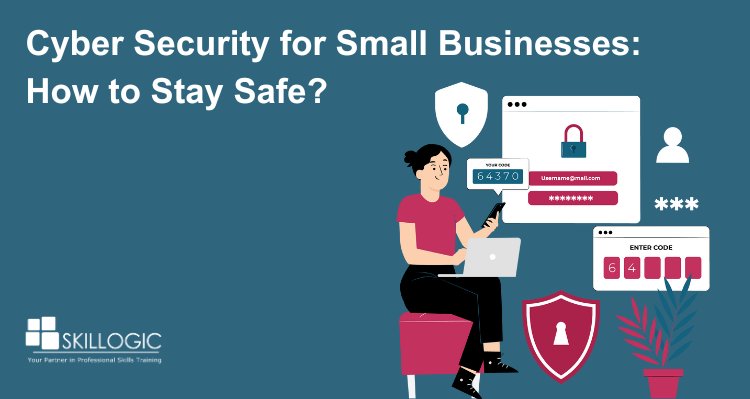
Cyber security is a critical business priority for small businesses, not just large organizations. Small companies often handle customer information, payment details, employee records, and other sensitive data, making them attractive targets for cyber criminals. Limited budgets, smaller IT teams, and outdated security practices can make it harder to detect and prevent attacks. A successful incident can result in financial losses, operational disruption, data exposure, and damage to customer trust.
Common threats such as phishing, ransomware, malware, password attacks, and social engineering can affect businesses of any size. Small businesses may also face greater challenges in recovering from an attack because they often have fewer resources for incident response and business continuity. Understanding these risks is the first step toward building a stronger security posture.
The good news is that effective cyber security does not always require a large budget. Simple measures such as using strong and unique passwords, enabling multi-factor authentication, keeping software updated, backing up important data, restricting access to sensitive information, and providing regular employee security awareness training can significantly reduce risk.
In this blog, we will explore the key cyber security threats facing small businesses and practical steps they can take to protect their systems, data, employees, and customers.
Why Cyber security is Crucial for Small Businesses
The importance of cybersecurity for small businesses cannot be emphasized enough.Small enterprises often have close relationships with their clients, and any compromise in security can tarnish their reputation and erode trust. This trust is critical for business survival, especially in competitive industries.
Impact of Cyber Attacks on Small Businesses
The financial and operational consequences of cyber attacks can be devastating for small businesses. Beyond the immediate costs of restoring systems or paying ransoms, small businesses may face:
- Loss of customer trust: A data breach can make customers wary of engaging with a business again.
- Downtime: Cyber attacks often force businesses to halt operations, resulting in lost revenue.
- Legal liabilities: Small businesses may face legal action if sensitive customer information is compromised.
- High recovery costs: With limited resources, small businesses may struggle to recover from a major cyber incident.
According to recent studies, nearly 60% of small businesses go out of business within six months of a major cyber attack. The stakes are incredibly high, which is why prioritizing cyber security is a must.
Common Cyber Threats for Small Businesses
Small businesses face many of the same cyber threats as large organizations, but they often have fewer resources, limited security expertise, and smaller IT teams to defend against them. This makes them attractive targets for cybercriminals who look for weaknesses that can be exploited easily. Common threats include phishing, ransomware, malware, password attacks, and social engineering, which can lead to financial losses, data breaches, operational disruption, and damage to customer trust. Understanding these risks is the first step toward building a stronger security posture.
By using multi-factor authentication, keeping software updated, training employees to recognize suspicious activity, maintaining secure backups, and applying access controls, small businesses can reduce their exposure and respond more effectively when an incident occurs.
1. Phishing Attacks
Phishing attacks remain one of the most prevalent cyber threats. Attackers use deceptive emails or messages that appear to be from legitimate sources to trick individuals into revealing sensitive information, such as login credentials or financial details.
How to Protect Against Phishing:
- Train employees to recognize phishing attempts.
- Implement email filtering solutions to block malicious messages.
- Encourage the use of multi-factor authentication (MFA) for sensitive accounts.
According to Verizon’s DBIR, phishing was involved in 16% of confirmed data breaches, highlighting its continued threat to businesses. This makes employee awareness, email filtering, and MFA essential for reducing phishing risks.
2. Ransomware
Ransomware is a type of malicious software that encrypts a victim's data, rendering it inaccessible until a ransom is paid. Small businesses are particularly susceptible to ransomware attacks due to often insufficient security measures.
How to Protect Against Ransomware:
- Regularly back up data and ensure backups are stored offline.
- Keep software and operating systems updated to patch vulnerabilities.
- Use robust antivirus and anti-malware solutions.
According to Verizon’s Data Breach Investigations Report, ransomware was involved in 44% of all breaches analyzed, increasing 37% from the previous year.
For small and medium-sized businesses, ransomware appeared in 88% of breaches, highlighting the need for stronger security controls and reliable data backups.
3. Data Breaches
Data breaches occur when unauthorized individuals gain access to sensitive information, such as customer data, employee records, or financial information. Small businesses often collect valuable data that can be exploited by cybercriminals.
How to Protect Against Data Breaches:
- Implement strong password policies and regular password changes.
- Limit access to sensitive data based on employee roles.
- Conduct regular security audits to identify vulnerabilities.
According to IBM’s 2026 Cost of a Data Breach Report, the average cost of a data breach in India reached ₹25.5 crore in 2026, highlighting the serious financial impact of data breaches.
4. Malware
Malware is a broad term for malicious software designed to harm or exploit devices. This includes viruses, worms, spyware, and Trojans. Malware can be delivered through infected email attachments, malicious downloads, or compromised websites.
How to Protect Against Malware:
- Install reputable antivirus software and keep it updated.
- Avoid downloading software or files from untrusted sources.
- Educate employees about safe browsing habits.
According to the Microsoft Digital Defense Report 2025, Microsoft blocks an average of 4.5 million new malware files every day, highlighting the scale of the malware threat.
5. Insider Threats
Not all cyber threats come from external sources. Insider threats occur when employees, either maliciously or accidentally, compromise an organization’s security. This could include leaking sensitive data or inadvertently introducing malware.
How to Protect Against Insider Threats:
- Monitor employee access to sensitive data and systems.
- Provide cybersecurity training to help employees understand their responsibilities.
- Develop an incident response plan to address potential insider threats.
6. Distributed Denial of Service (DDoS) Attacks
DDoS attacks overwhelm a network or website with traffic, causing it to slow down or become unavailable. While larger organizations are often the targets, small businesses can also be affected, particularly if they rely on online services.
How to Protect Against DDoS Attacks:
- Utilize content delivery networks (CDNs) to absorb excess traffic.
- Implement rate limiting to control traffic flow.
- Invest in DDoS protection services.
Cyber threats are a growing concern for small businesses, and the potential consequences of a cyber attack can be devastating. By understanding these common threats and implementing appropriate security measures, small businesses can significantly reduce their risk and safeguard their operations.
Refer these articles:
- 10 Essential Cyber Security Tools for Beginners
- How to Start a Career in Cyber Security
- Cyber Security Compliance and Regulations
Why Do Hackers Target Small Businesses?
Small businesses are increasingly targeted by cybercriminals because they often handle valuable data while having fewer resources to prevent and respond to attacks. Cybercriminals may look for weaknesses in employee accounts, outdated software, third-party services, and security controls rather than focusing only on the size or revenue of an organization. Understanding these common reasons can help small businesses identify their risks and strengthen their security posture.
1. Limited Security Resources
Many small businesses operate with limited IT budgets, small technical teams, or no dedicated cybersecurity staff. As a result, essential controls such as multi-factor authentication, endpoint protection, security monitoring, and regular vulnerability management may not be implemented consistently. Attackers can take advantage of these gaps to gain unauthorized access to systems and sensitive information.
2. Valuable Business Data
Small businesses often hold valuable information, including customer details, employee records, payment information, business documents, and intellectual property. If this information is stolen, attackers may use it for fraud, identity theft, extortion, or sell it through illicit online marketplaces. Protecting sensitive data should therefore be a core part of every small business's cybersecurity strategy.
3. Lack of Awareness and Training
Many small business owners and employees are unaware of common cyber threats, such as phishing attacks, ransomware, and social engineering. This lack of awareness can lead to poor cybersecurity practices, such as using weak passwords or falling for scams. Hackers often exploit this ignorance to gain access to systems and data.
4. Third-Party Vulnerabilities
Small businesses commonly depend on vendors and service providers for cloud platforms, payment processing, software, IT support, and other essential services. A security weakness at a third-party provider can create risks for the business and its customers. Businesses should evaluate vendor security practices, limit unnecessary access, and review third-party permissions regularly.
5. Financial Gain with Less Resistance
Financial motivation is a major reason behind many cyberattacks. Criminals may target small businesses with ransomware, business email compromise, credential theft, or payment fraud because successful attacks can result in direct financial benefits. Ransomware can also cause significant operational disruption, putting pressure on businesses to restore access quickly.
Small businesses should not assume that their size makes them invisible to cybercriminals. A practical security strategy that combines employee training, multi-factor authentication, regular software updates, secure backups, access controls, and continuous monitoring can significantly reduce exposure to common attacks. Reviewing security practices regularly also helps businesses adapt as cyber threats and attack techniques evolve.
Refer these articles:
- Cyber Security Course Fee in India
- Cyber Security Scope in India
- How to Become a Cyber Security Expert in India
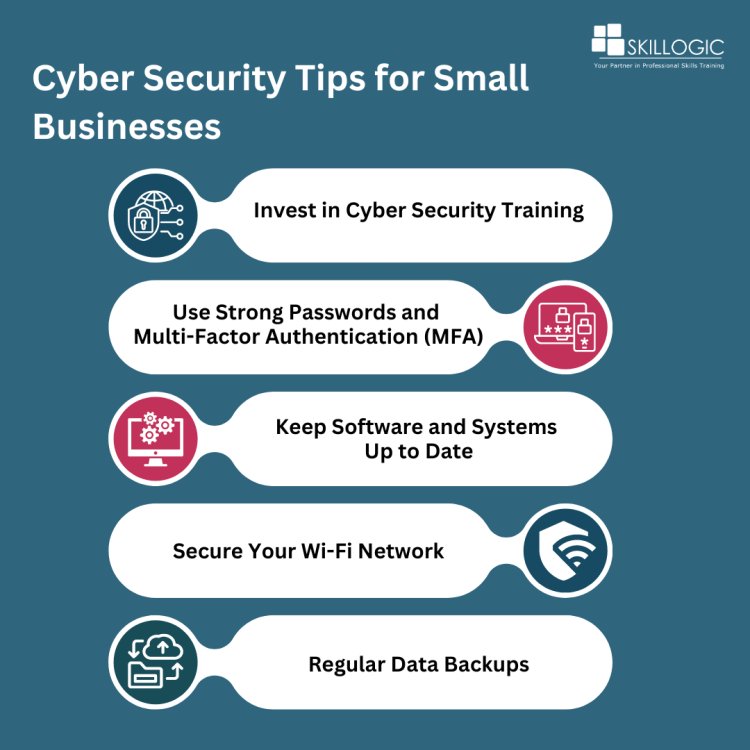
Cyber Security Tips for Small Businesses
The most effective defense against cyber threats is a robust offensive strategy. Small businesses must proactively enhance their cybersecurity measures to prepare for the ever-evolving landscape of cyber attacks. Here are some essential cybersecurity tips that every small business should adopt to secure their future in cyber security:
1. Invest in Cyber Security Training
Training your staff is one of the most effective ways to prevent cyber attacks. Cyber Security training can teach employees to recognize phishing attempts, avoid malware, and follow best practices for handling sensitive data. It’s crucial to make sure that all employees—regardless of their role—are educated about cyber security risks. There are many Top Cyber security courses available that cater specifically to small businesses, helping you ensure your team is prepared.
- Regularly train employees on the latest threats.
- Implement tests and simulations to reinforce lessons learned.
Example: A small accounting firm can conduct a monthly phishing simulation where employees receive a fake suspicious email and learn how to identify warning signs before responding.
2. Use Strong Passwords and Multi-Factor Authentication (MFA)
Weak passwords are an open invitation to cyber criminals. Ensure that employees use strong, unique passwords for all accounts, and encourage the use of password managers to securely store them. Multi-Factor Authentication (MFA) provides an extra layer of security by requiring not just a password but also a second form of identification, such as a phone code or fingerprint.
- Require strong, unique passwords for all accounts.
- Implement MFA to add another layer of security.
Example: If an attacker obtains an employee's email password through phishing, MFA can prevent access if the attacker cannot provide the employee's second authentication factor.
3. Ensure Software and Systems Are Regularly Updated
Hackers take advantage of weaknesses in outdated software to infiltrate systems.To reduce this risk, make sure that all systems, software, and devices are updated regularly. Enable automatic updates wherever possible, and ensure that your cyber security solutions are always current.
- Regularly update all software and systems.
- Install and maintain firewalls and anti-virus software.
Example: A retail business can configure its point-of-sale computers to install approved security updates automatically, reducing the risk of attackers exploiting known software vulnerabilities.
4. Secure Your Wi-Fi Network
A weak or unsecured Wi-Fi network is a goldmine for cyber criminals. Make sure your business's Wi-Fi is encrypted, password-protected, and hidden from public view. Segment your network so that sensitive business data is kept separate from guest access points.
- Encrypt and password-protect Wi-Fi networks.
- Create a separate network for guest users.
Example: A small café can provide customers with a guest Wi-Fi network while keeping its payment systems and staff computers on a separate business network.
5. Regular Data Backups
Backing up your data regularly ensures that you won’t lose everything in the event of a ransomware attack or data breach. Use cloud storage solutions and offline backups to keep important files secure.
- Schedule automatic data backups.
- Store backups in multiple secure locations, including offline.
Example: A small design agency can automatically back up project files to secure cloud storage while maintaining an additional offline backup that is disconnected from the main network when not in use.
Refer these articles:
- How to Become a Cyber Security Expert in Hyderabad
- How to Become a Cyber Security Expert in Chennai
- How to Become a Cyber Security Expert in Pune
How to Protect Your Small Business from Cyber Threats
As cyber threats become more common, small businesses must adopt strong cyber security practices to keep their data safe. Here are key steps you can take to protect your business:
1. Perform Regular Security Checks
Routine security assessments help detect vulnerabilities in your system. Hiring an expert to review your current security setup can ensure you're prepared for potential threats.
- Schedule security assessments on a regular basis.
- Fix any problems or weaknesses that are found right away.
2. Develop a Cyber attack Response Plan
Despite having robust defenses, cyber attacks can still occur. Having a well-defined response plan can minimize damage and accelerate recovery. Your plan should include steps to take after an attack, who to contact, and how to restore affected systems.
- Create a detailed action plan for responding to cyber attacks.
- Train employees on how to follow the plan during an attack.
3. Stay Compliant with Data Protection Laws
It's important for small businesses to follow data protection regulations, like GDPR or CCPA. By maintaining compliance, you can prevent fines and safeguard your customers' data.
- Learn about the data protection laws that apply to your business.
- Regularly update your practices to stay in line with legal requirements.
Small businesses are increasingly vulnerable to cyberattacks, and the repercussions of a security breach can be devastating. By prioritizing cybersecurity and implementing the following strategies, you can safeguard your business against potential threats. Staying vigilant, educating your employees through a Cyber Security certification course, and regularly updating your security measures are essential to defending against cybercriminals. As cyber threats continue to evolve, taking proactive steps to secure your small business is crucial for ensuring long-term success.
At SKILLOGIC Institute, we recognize the critical need for small businesses to safeguard themselves in today’s increasingly digital world. Our Cyber Security Professional Plus Course is tailored to empower small business owners and their teams with the essential skills required to tackle the unique security challenges they encounter. Accredited by esteemed organizations such as IIFIS and NASSCOM FutureSkills, this course provides comprehensive training that includes real-time projects and exclusive practice labs. Participants will gain hands-on experience in safeguarding their systems against potential threats, laying a strong foundation for a rewarding career in cyber security.
With a growing community of over 100,000 learners, SKILLOGIC is committed to helping small businesses enhance their cyber security measures through top-tier education and practical skills. Our emphasis on real-world applications and industry-recognized certifications makes us a trusted partner for small businesses seeking to safeguard their operations and customer data. Join us to take proactive steps in securing your business and ensuring its future in an increasingly connected world.