10 AI Tools for Business Analysts
Explore 10 AI tools for business analysts that help automate tasks, analyse data, gather requirements, improve workflows, and support smarter business decisions.
 Aiswarya N
Business analysts help organizations understand problems, improve processes, and make better decisions. Their work often involves gathering requirements, reviewing data, preparing reports, documenting business needs, and communicating with stakeholders. These tasks can take considerable time, especially when information comes from multiple sources.
This is where AI tools can help. They can summarize lengthy documents, organize meeting notes, explore datasets, draft requirements, and support project planning. However, they do not replace a business analyst’s judgment or understanding of business needs.
In this guide, we will explore 10 AI tools for business analysts, explain their practical uses, and discuss how to choose tools that suit different business analysis tasks.
What is the Role of AI in Business Analysis?
AI helps business analysts identify patterns, draft requirements, review documents, and summarize meetings, reducing manual work and allowing more time for problem-solving and decision-making.
McKinsey’s State of AI global survey reports that 80% of individual professionals using generative AI report individual productivity improvements.
Common tasks AI can support business analysts:
- Requirement documentation: AI helps business analysts turn stakeholder discussions into clear business requirements, user stories, and meeting notes that development teams can understand.
- Data exploration: AI helps analysts examine business data, spot patterns, identify unusual values, and understand trends that may affect business decisions.
- Process analysis: AI can help map existing workflows, identify delays or repeated steps, and highlight areas where a business process could be improved.
- Stakeholder communication: AI helps explain technical findings in simple language, making it easier for business teams, clients, and technical teams to understand the results.
- Project reporting: AI can summarize project progress, highlight potential risks, list pending tasks, and prepare status updates to help teams stay informed.
Analysts should validate AI-generated outputs to ensure accuracy and business relevance.
AI can also reduce time spent on repetitive tasks. According to Keyhole Software’s AI Efficiency Statistics report, generative AI users in a cited U.S. worker survey reported saving an average of 5.4% of their work hours per week, equivalent to about 2.2 hours in a 40-hour workweek. These are self-reported savings, not guaranteed results.
Understanding these applications helps clarify the role of business analyst professionals in using AI to support analysis, communicate findings, and make informed business decisions.
Read More:
- Cybersecurity Considerations for Business Analysts
- How Business Analysts Drive Digital Transformation
- Bridging the Gap Between IT & Business as a Business Analyst
10 AI Tools for Business Analysts
The right tool depends on the task. Some tools are useful for writing and research, while others support data visualization, project coordination, or meeting documentation.
Here are 10 options and examples of how business analysts can use them:
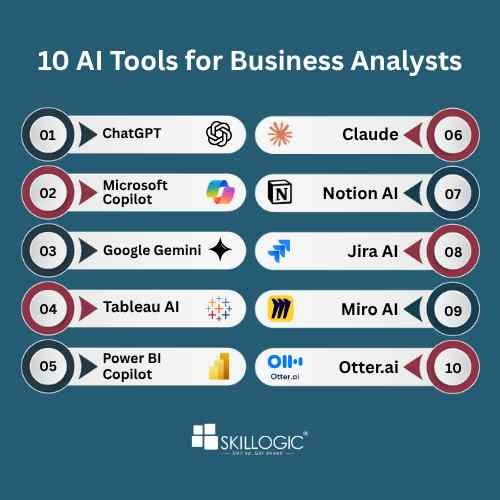
1. ChatGPT
ChatGPT helps business analysts brainstorm solutions, draft requirements, and summarize business documents. It can also organize stakeholder feedback and suggest questions for further investigation.
Common uses:
- Generating business ideas and insights.
- Drafting business requirements and user stories.
- Summarizing documents and reports.
2. Microsoft Copilot
Microsoft Copilot supports business analysis tasks across compatible Microsoft applications. It can help analysts work with spreadsheets, summarize documents, and prepare presentations.
Common uses:
- Analyzing data in Excel.
- Summarizing documents in Word.
- Preparing presentation outlines and reports.
3. Google Gemini
Google Gemini assists with research, summarization, and documentation. It can help analysts explore business problems, organize findings, and prepare initial drafts.
Common uses:
- Researching business problems.
- Summarizing information from documents.
- Supporting documentation and analysis.
ChatGPT, Microsoft Copilot, and Google Gemini are general-purpose AI assistants, rather than tools designed only for business analysis. Their development also reflects the wider investment in AI technology. Stanford HAI's AI Index Report records USD 285.9 billion in U.S. private AI investment in 2025. This is an indicator of the scale of AI investment, not a measure of the effectiveness of any individual tool.
4. Tableau AI
Tableau AI supports data exploration and visualization, helping analysts identify patterns and communicate business insights through dashboards and reports.
Common uses:
- Exploring business data.
- Identifying trends through visualizations.
- Supporting data-driven decisions.
5. Power BI Copilot
Power BI Copilot helps users explore business data, summarize reports, and create visualizations through natural-language prompts, depending on available features and licensing.
Common uses:
- Creating report summaries.
- Generating visualizations.
- Exploring business trends.
6. Claude
Claude helps business analysts review lengthy documents, organize requirements, and summarize stakeholder discussions. It is useful for preparing structured drafts from detailed information.
Common uses:
- Analyzing business documents.
- Drafting business requirement documents.
- Summarizing stakeholder discussions.
7. Notion AI
Notion AI helps teams organize project information and turn notes into structured documentation. It can also summarize discussions and highlight follow-up tasks.
Common uses:
- Organizing business analysis notes.
- Summarizing meeting discussions.
- Managing project documentation.
8. Jira AI
Jira's AI capabilities support Agile teams by helping organize project information, summarize issue discussions, and prepare task descriptions.
Common uses:
- Supporting Agile project management.
- Summarizing project updates.
- Organizing tasks and requirements.
9. Miro AI
Miro AI supports collaborative workshops by helping teams organize ideas, explore solutions, and develop workflow drafts.
Common uses:
- Creating process maps and workflows.
- Brainstorming business solutions.
- Organizing collaborative workshop findings.
10. Otter.ai
Otter.ai helps business analysts document meetings through transcription and summaries, making it easier to review discussions and track follow-up actions.
Common uses:
- Transcribing stakeholder meetings.
- Summarizing discussions.
- Identifying action items and follow-ups.
Read More:
- How to become a Business Analyst in India
- Business Analytics Scope in India
- How to Become a Business Analytics Expert in India
How to Choose the Right AI Tool for Business Analysis
Not every business analyst needs all 10 AI tools. The best choice depends on the type of work you do, the software your organization already uses, and the information you are allowed to share.
Use these steps to select suitable AI tools:
- Identify your main requirements: Decide whether you need help with documentation, data analysis, meetings, process mapping, or project reporting.
- Check existing integrations: Tools that work with your current applications may be easier to introduce into your daily workflow.
- Compare features and costs: Review available features, subscription plans, usage limits, and licensing requirements before committing.
- Review privacy and security: Check how the tool handles uploaded files, customer data, meeting recordings, and confidential business information.
- Test the output: Start with a small task and compare the AI-generated result with a verified answer or an existing work process.
- Measure the benefit: Check whether the tool reduces effort, improves documentation quality, or helps the team make better decisions.
For example, an analyst who spends most of the day preparing reports may benefit from Microsoft Copilot or Power BI Copilot, depending on their workflow. Someone who regularly facilitates stakeholder workshops may find Miro AI or Otter.ai more useful. Exploring generative AI for business analysts can also help professionals identify tools that suit their daily responsibilities and improve productivity.
When evaluating AI tools for business analysts, consider accuracy as well as speed. A tool that produces a report quickly is not useful if its calculations are incorrect or it misses an important business requirement.
Organizations should also set clear rules for reviewing AI-generated work, protecting confidential information, and recording important decisions. These practices help teams use AI in business analysis responsibly and consistently.
In short, AI tools can help business analysts with tasks such as documenting requirements, summarizing meetings, visualizing data, and preparing project reports. Tools like ChatGPT, Microsoft Copilot, Tableau AI, Power BI Copilot, and Jira AI offer different capabilities, so the best choice depends on the task and business needs.
To use these tools effectively, analysts should identify a specific problem, choose a suitable tool, and verify its output before making decisions. Combining AI capabilities with analytical skills, business knowledge, and human judgment helps analysts deliver practical solutions.
To build a successful business analysis career, develop practical skills in data analysis, business requirements, process improvement, and stakeholder communication. Understanding how businesses use data to solve problems can help you prepare for opportunities across different industries.
If you're looking to build a career in business analysis, developing practical skills through industry-focused training can help you prepare for relevant job opportunities. Whether you're considering a business analyst course in Hyderabad, Bangalore, Chennai, Coimbatore, Ahmedabad, Pune, Mumbai, Nagpur, or Delhi, gaining knowledge of business requirements, data analysis, and process improvement can help you understand the responsibilities of a business analyst and prepare for the field.
SKILLOGIC is a globally recognised professional training institute that helps learners develop practical skills for their chosen careers. SKILLOGIC’s Certified Business Analyst Course offers hands-on training in business requirements gathering, data analysis, process improvement, business reporting, and stakeholder communication through practical exercises and real-world projects. The programme includes expert guidance, an industry-relevant curriculum, and globally recognised IABAC certification. With training centres across India, SKILLOGIC offers business analyst course in Bangalore, Chennai, Coimbatore, Hyderabad, Ahmedabad, Pune, Mumbai, Nagpur, and Delhi for learners looking to strengthen their business analysis skills and prepare for career opportunities in the field.